
MENTORSHIP/SUPPORT
We are aware that a lot of students go through hard times in a bid to meet their academic goals and expectations which may sometimes seem overwhelming. If this is your challenge, you don’t have to worry much. We have a team of academic experts who are willing to listen to you and offer a helping hands to alleviate your academic struggles for free. All you need do is click on the button below and our team will reach out to you, cheers!
Academic Support
Contact us
- Enugu, Nigeria.
- (234)-701-114-7037
- support@researchpages.com.ng
- Week Days: 09.00 to 18.00 Sunday: Closed
Google Scholar Research

May 2, 2025
Google Scholar is the bomb; it is free, friendly, and the most used research base for all researchers, students, lecturers, and general publishers. In a nutshell, Google Scholar is your one-stop site for any form of research you are currently carrying out. The search engine was created to enable scholars globally to discover and use relevant kinds of literature and publications by high-ranking authors for their research endeavours. The papers available on the site are all peer-reviewed, comprising the following categories: journal papers, published books, conference proceedings, articles by professional publishers, repositories and university websites, among others.
Google Scholar is one tool that will help you explore related and relevant papers with well-organised citations and up-to-date references in all styles and editions.
Google Scholar is important for the following reasons;
Easy and free access for all and sundry
It has a vast range of knowledge and information to grab and write a winning paper
It helps you to write your original paper that is publishable in any publishing platform
It is useful for every category of researchers, e.g. undergraduates, postgraduates, academics, etc.
It provides reliable academic sources like citations and references
It helps you to track citations
It can connect its users with all their related studies easily
It makes research enjoyable and efficient for students and newbies
Google Scholar Peer Review:
Let’s first look at the meaning of peer review. Peer review is the process whereby independent scholars who are experts in your field of study or area of specialization are engaged to critically evaluate your paper, article, research work or thesis to confirm its authenticity, accuracy, clarity, relevance and credibility of your work before it is published for others to read, cite and referenced globally. It’s a kind of quality assurance process on published works.
That being said, Google Scholar was created to fill this gap by providing researchers with millions of other published works to review, to help you organise your work to forestall rejection or bad reviews after it has been subjected to the peer review process.
Google Scholar as a research base site has both peer-reviewed and non-peer-reviewed works, it is the researcher who will search for the peer-reviewed papers by filtering results using specific keywords such as “peer-reviewed papers”. This will enable the sourcing of very reliable and academic papers to write your paper.
As earlier said, the scholarly sources examples on Google Scholar include: journal articles or papers, published books, projects and theses and conference proceedings and dissertations. All these are searchable on the Google Scholar platform.
How to Use Google Scholar
Using Google Scholar is very easy, there are just three steps you need to take to get there.
Step 1: Search Google Scholar on the Google Search engine (this process requires a fast internet connection). Then select the first item that appears on your computer screen. See image below. Click on it to access the site.
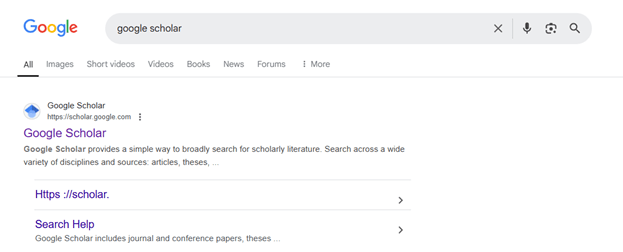
You will see a search area that appears like what is displayed below. This is how to enter Google Scholar.
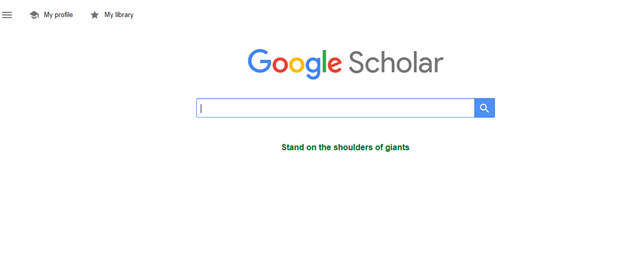
This search box enables a researcher to have access to literature or materials relevant to the subject or area he or she is researching. You are expected to insert or type in your keywords or the entire project or research topic you need materials on. After inserting your topic, click the blue search icon in the top right corner of the screen, and the site will provide you with literature from which you can select and use for your study.
I have written a detailed method of using Google Scholar to search relevant material to write the background of the study in your project, You can find the details on this page.
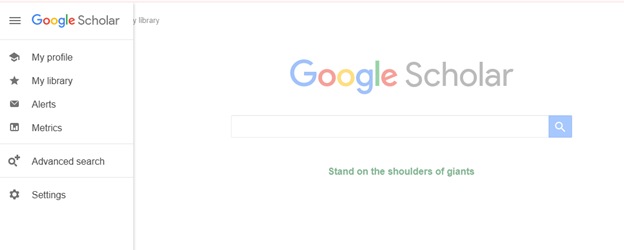
You can also use this method to search for journal articles. By typing in your keywords, relevant journal articles will pop up for you to choose from. This process is just like you doing an exact search on Google; recall that you search on Google by inserting the search subject you need details of. The only difference is that in Google, you will get displayed answers from websites or blogs written by various authors on the inserted subject, whereas on Google Scholar, you get already researched, and uploaded high-quality papers by renowned writers in your specific field of study or area of research. The results you will get are narrowed down and specifically research-related, and for research only, not the general information you get when using Google to search. For example, if you want to search a specific journal on Scopus, all you need to do is type in “Journal in Scopus”, and you will have a bunch of related and useful literature written in Scopus standards. With these, there is no doubt that Google Scholar is the best search engine for journal articles so far. Though there are other good, similar sites, Google Scholar stands out in many ways, maybe because it is a direct product of Google, our beloved “Google”.
To know how to index a journal in Google Scholar, visit this page for insight.
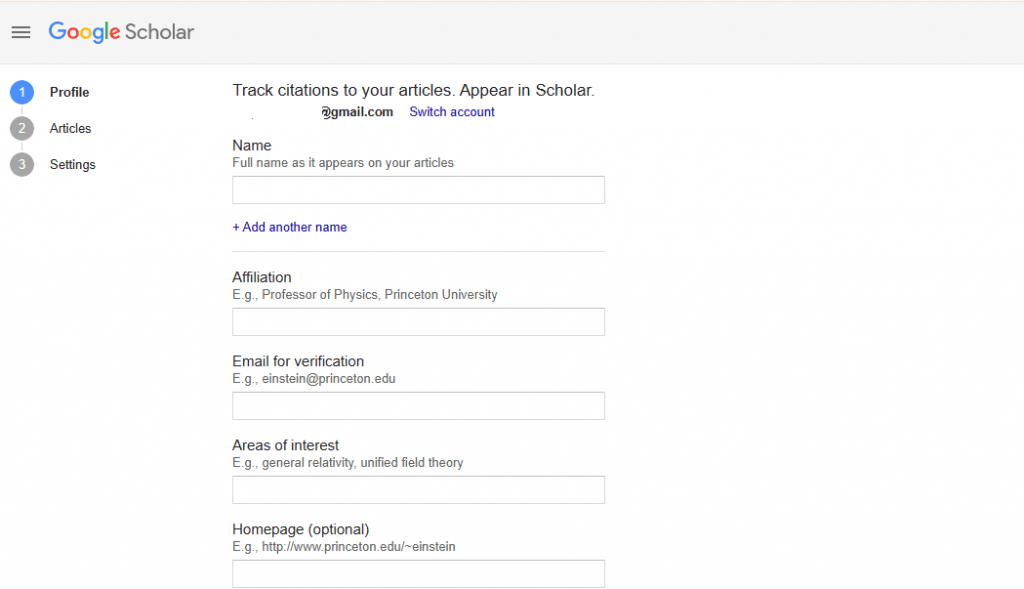
This article is only to teach you how you can use this site to do good research, but if you intend to publish your well-written articles or papers, the Google Scholar profile helps you achieve that. All you need to do is showcase your academic publications on the profile, while you can track how many people have cited your work, read your papers or share your papers. By properly setting up and updating your profile, you make it easy for other people to search for your name and find your papers without stress.
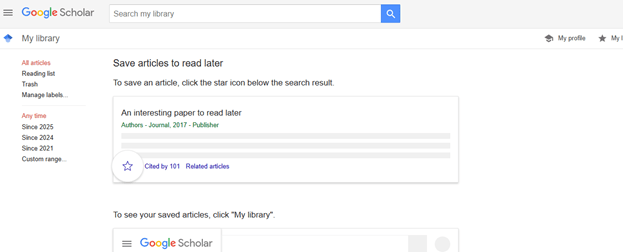
You can also save the articles you have read in your library page. The articles can later be visited from time to time without going through the rigmarole of searching from scratch in the search box.
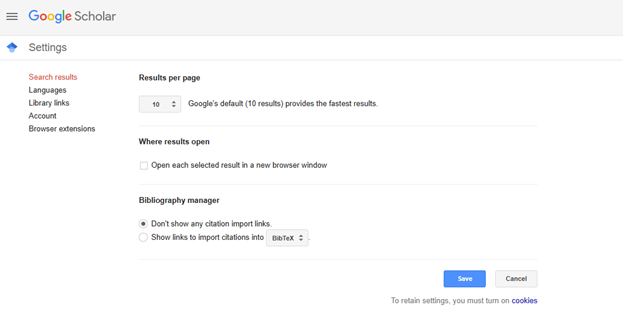
Where to find research papers
When you click the search icon, a variety of links to relevant uploaded materials will display on the front page. Yours is to scroll up and down until you can find the topic that best fits your research topic.
You can download your chosen material or materials by clicking on it. When it opens, carefully locate the PDF icon (for free materials) around the header area. Click on the PDF icon to have the paper downloaded into your device in PDF format. You can then save the paper with a name that you can easily remember. You are free to download as many papers as you want; there is no restriction of any sort except for paid papers.
You can further narrow your search by going to the left-hand corner of your screen, just under the articles, you will find the following links:
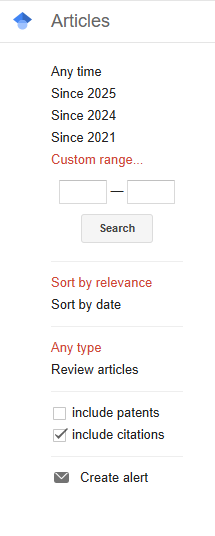
The above helps you to narrow down your search to a specific period or year by selecting the period you want or inserting the period say “2020 to 2025” in the search boxes provided under the “Custom range link” you could go further in your advance search by using the “search by relevance” link or “any type”. The last on the above is the “create alert”, where users of the site can create reminder alerts to get notified when new papers, particularly relevant to their field, are published on the site.
Google Scholar Research Topics
If you have any questions or concerns, kindly reach out to us today